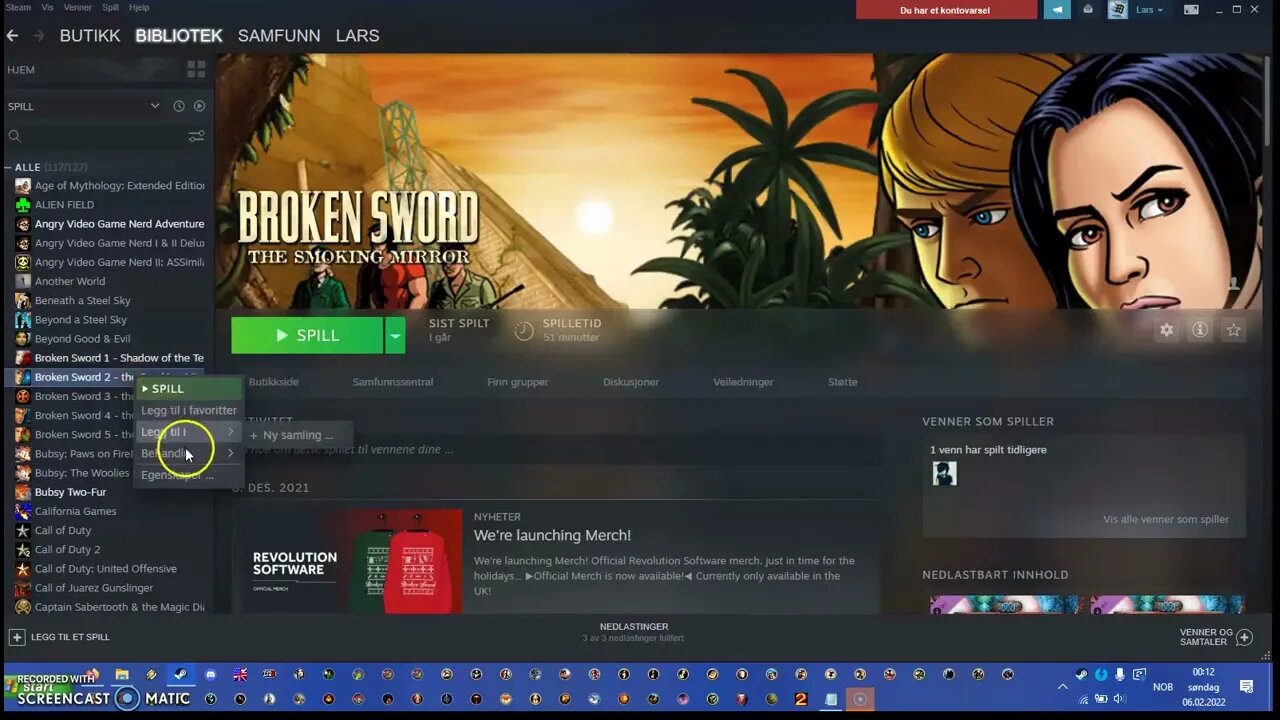
Broken Sword 1 and 2 GOG offline installer, how to change language, French, German tutorial
Incase you dont have OGG files in Broken Sword 2 on Steam... which maybe i added by accident. But here is link to it here " https://www.scummvm.org/games/#addons-sword2 "
A little long video, so if you dont want to watch it all way through. Here is text tutorial
1: I have Steam versions of Broken Sword 1 and 2, so i can just download in language and keep originals of that one as backup. So what you need to backup is this from Steam installation folder called "Original"
Broken Sword 1
- Video folder(called SMACKSHI in my french installation) the files have all SMK files to them so should be not too hard to find
- SPEECH FOLDER
Thats all for Broken Sword 1 that you need to keep copy of
Broken Sword 2 "Original"
- On the root folder of that map of Original, copy all the SMK and OGG files, everyone of them there take backup of. Very important, those are the video files.
- On the root folder of that map of Original", copy Speech1 and Speech2, thats dialogue changes of language in game
- On the root folder of that map of Original", copy TEXT.CLU, which will change the language interface of the game in Broken Sword 2 of that language you used on Steam to install in.
So now i have mentioned what you need to keep saved. Here is tutorial how to fix it on your PC
First of lets make a shortcut file before we start tutorial, on dekstop right click and pick "New- Shortcut" then write this in there " "C:\Program Files\ScummVM\scummvm.exe" sword1
And click next, pick whatever name you want, doesnt matter. You can right click the shortcut and click properties if you want to change icon to that of the game where its installed, pick icon there if you wish to make it look proper. Now do the same thing again but just write sword2 at the end of the value. And now you have shortcuts for Broken Sword 1 and 2. Reason why we need these shortcuts is because GOG is just gonna make it automatically to english which isnt helping here. So delete "Launch Broken Sword 1" or 2 shortcuts if you wish too from the folder and just put the new shortcuts you made there instead.
Well now we got that ouf ot he way, here is the tutorial
Broken Sword 1 Tutorial
1: Open your ScummVM program
2: Make sure to add the games Broken Sword 1 and 2 destination of where you installed them on your PC, and if you dont want the "4:3 aspect ratio" you can go to "Option" after you added the game, go to Graphics tab, override graphics checkmark, then stretch mode, pick "Stretch to window", click ok and you should be good to go now on that one, but before you quit ScummVM program, checkmark Broken Sword 1 and click "Edit" button, then on Game" tab, change Language to that of your preferred one, for this instance its french, this changes language interface of the game, this for some reason doesnt work on Broken Sword 2 so you dont need to bother changing it on that one, then click ok.
3: So now the games are all added in ScummVM. Now go to Broken Sword 1 GOG destination folder, go to "Video" folder. Delete all of the files in there and replace it with the SMK files. This will replace the language of the cutscenes in the game. Then go to "Speech" folder, delete the ones there and replace it with Speech you took copies of from Steam folder.
4: If you start the Broken Sword 1 game now, the shortcut then it should work.
Broken Sword 2 Tutorial
1: Go to GOG installation destination of Broken Sword 2, you can aswell remove the files in "Extra" folder. Though dont paste anything in there since its no use either way. Go back to root folder of Broken Sword 2 GOG version. Paste all the SMK and OGG from the Broken Sword 2 "original" steam, of what language you picked there. Not sure why the rules is different here but it is. And also remove "Speech1 and Speech2" there and replace it with your "Speech1 and Speech2" thats from Steam Broken Sword 2 Original, so that way the dialogue changes.
2: And finally. Remove Text.clu" and paste your "TEXT.CLU" from Steam Broken Sword 2 Original.
3: And that should fix the problem, so if this doesnt work, let me know!
Hope this wasnt too complicated, not that this does me anything since i usually play it in english language. But for fans who want that experience they prefer it in!
-
![MAHA News [12.5] Glyphosate Study Retracted (MONSANTO), Vaccine News (COVID), DMSO Chat](https://1a-1791.com/video/fwe2/02/s8/1/0/u/D/F/0uDFz.0kob-small-MAHA-News-12.5.jpg) 1:01:00
1:01:00
Badlands Media
14 hours agoMAHA News [12.5] Glyphosate Study Retracted (MONSANTO), Vaccine News (COVID), DMSO Chat
35.1K5 -
 1:11:14
DeVory Darkins
6 hours agoJeffries SCRAMBLES After National Gas Prices hit record low amid AFFORDABILITY CRISIS
213K116 -
 56:44
56:44
The Quartering
6 hours agoSpam Calls Are Out Of Control, Candace Hits Rock Bottom & More Poison Food
60.6K97 -
 47:44
47:44
Tucker Carlson
6 hours agoRupert Lowe Warns of the Globalist Agenda Destroying the West and the Revolution Soon to Come
86K139 -
 1:16:03
Sean Unpaved
7 hours agoWill Miami Be "ODD MAN OUT" Of The College Football Playoff? | UNPAVED
35.8K1 -
 58:31
58:31
Jeff Ahern
4 hours ago $1.38 earnedFriday Freak out with Jeff Ahern
23.3K6 -
 27:03
27:03
The Kevin Trudeau Show Limitless
2 days agoThey're Not Hiding Aliens. They're Hiding This.
44.1K65 -
 2:04:26
The Culture War with Tim Pool
8 hours agoWoke Has INFECTED Goth, Punk, & Metal, MAGA Must Save the Art | The Culture War Podcast
147K68 -
 1:12:25
Steven Crowder
7 hours agoCNN Declares J6 Pipe Bomber White & Nick Fuentes Interview Reaction
357K336 -
 6:08:30
Dr Disrespect
8 hours ago🔴LIVE - DR DISRESPECT - ARC RAIDERS - FREE LOADOUT EXPERT
53.4K6