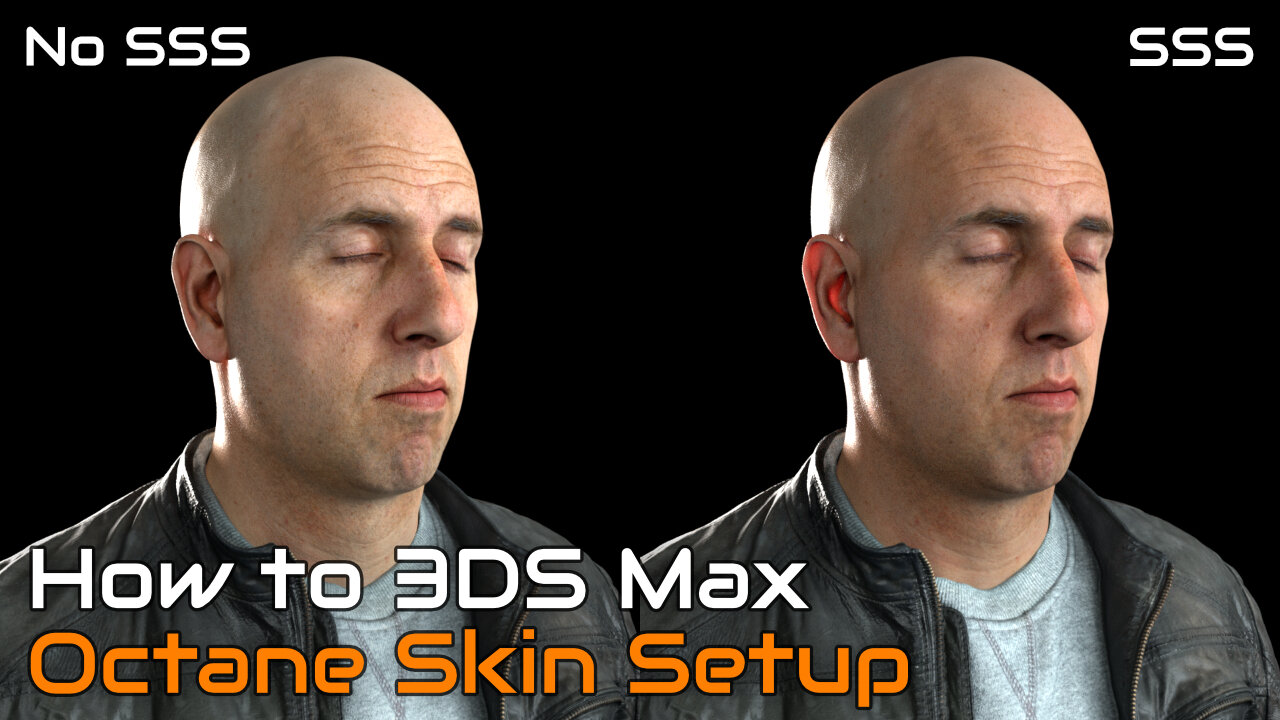
How to Create Realistic Skin with 3DS Max and Octane
4 years ago
107
How to Create Realistic Skin with 3DS Max and Octane
This tutorial goes over how to setup Octane Render - Random Walk Sub Surface Scattering for Realistic Skin. The tutorial will use the free head model from Ten24 Media. You can download the head model from:
https://www.3dscanstore.com/blog/Free-3D-Head-Model
The video is broken into two parts. You can navigate to the sections from the time code below.
Chapters
00:00 Introduction
00:31 Part 1 - Setup Head Model
17:30 Part 2 - Setup Octane Skin
---
http://www.ambocc.com
https://ambocc3d.gumroad.com/
---
#3dsmax #octanerender #ambocc
Loading comments...
-
 0:37
0:37
Ambocc 3D
2 years ago $0.01 earnedBlender 3D - Asian Cyberpunk City Flyby - Octane Render 4K Horizontal
891 -
 18:49
18:49
Ambocc 3D
4 years agoHow to Make Cartoons with 3DS Max and Octane
100 -
 0:54
0:54
jhoannyy
4 years agoRing around the rosie with Octane
17 -
 13:14
13:14
RogueTraderXXIV
4 years agoHOW TO CREATE ULTRA REALISTIC RUST AND WEATHERING EFFECTS | TABLETOP TUTORIAL
27 -
 2:09
2:09
theSaltshakers
4 years agoCreate with sound
81 -
 11:20
11:20
Jeff Stroup
4 years agoHow to Create a Linked List with C
13 -
 15:37
15:37
True Crime | Unsolved Cases | Mysterious Stories
1 day ago5 Disturbing 911 and 999 Calls Made by Killers
61 -
 11:32
11:32
Geoff_Tac
15 hours agoIWI Masada 9S Elite
25K1 -
 23:17
23:17
marcushouse
1 hour ago $0.07 earnedNearly 3 Starship Launches Every Week!? This New Approval is HUGE 🤯
58 -
 LIVE
LIVE
FyrBorne
14 hours ago🔴Battlefield REDSEC Live M&K Gameplay: Best Builds For Competitive
312 watching