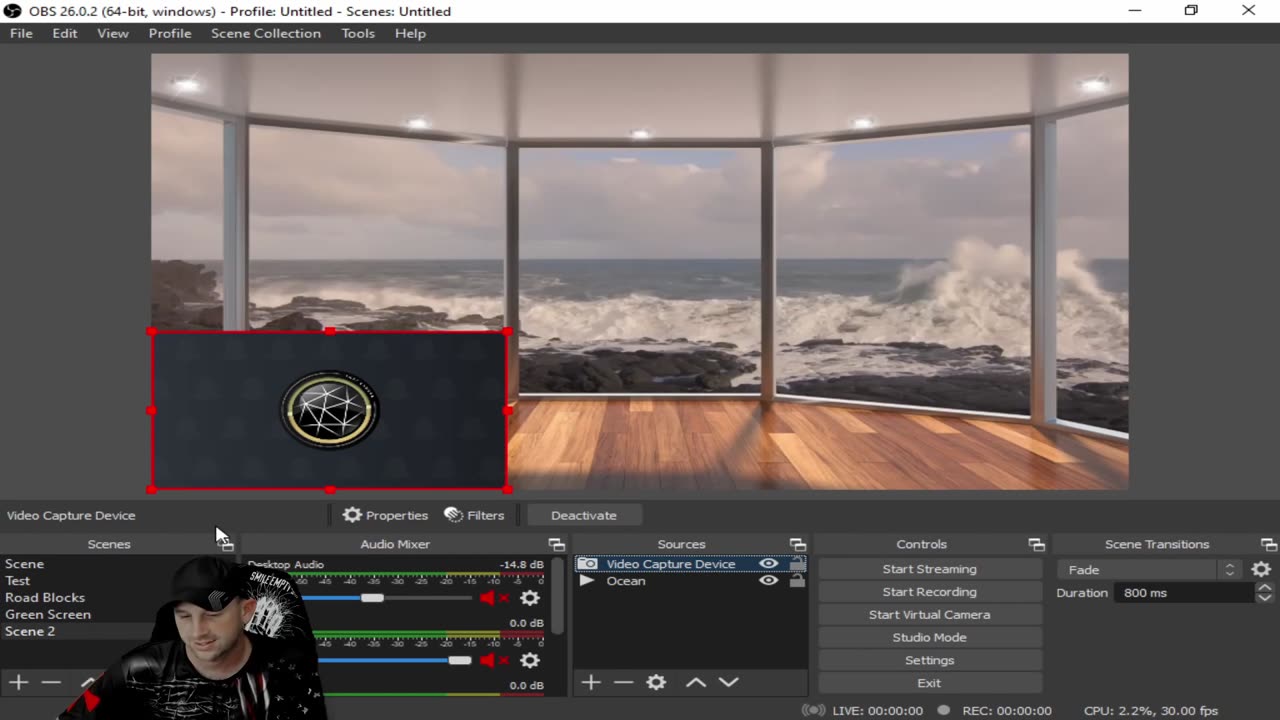
How to Add a Green Screen to Your Camera on OBS. Your Reaction Video Meeting Training Video & More
In today's Tech Tuesday, we show you how to add a green screen to your camera on OBS. Your Reaction Video Meeting Training Video & More. We receive many questions every week about helpful tips. We try to create as many tip videos as we can. If there is something you are stuck on and or have questions you need help on. Let us know in the comments below. We will try to put out videos as quick as we can to your questions.
To find out more info and download your free version of OBS, visit:
https://obsproject.com/
OBS Studio (formerly Open Broadcaster Software or OBS, for short) is a free, open-source, and cross-platform screencasting and streaming app. It is available for Windows, macOS, Linux distributions, and BSD. OBS Project raises funds on Open Collective and Patreon
OBS Studio is a free and open-source app for screencasting and live streaming. Written in C/C++ and built with Qt, OBS Studio provides real-time capture, scene composition, recording, encoding, and broadcasting via the Real Time Messaging Protocol (RTMP). It can stream videos to any RTMP-supporting destination, including YouTube, Twitch, Instagram and Facebook.
For video encoding, OBS Studio can use the x264 transcoder, Intel Quick Sync Video, Nvidia NVENC and the AMD Video Coding Engine to encode video streams into the H.264/MPEG-4 AVC or H.265/HEVC formats. It can encode multiple tracks of audio in the AAC format. More experienced users can choose any codecs and containers available in libavcodec and libavformat, or output the stream to a custom FFmpeg URL.
OBS Studio also supports plug-ins to extend its functionality.
OBS 24.0.0
The main user interface is organized into five sections: scenes, sources, audio mixer, transitions, and controls. Scenes are groups of sources like live and recorded video, text and audio. The mixer panel lets the user mute the audio, and adjust the volume through virtual faders, and apply effects by pressing the cogwheel next to the mute button. The control panel has options for starting/stopping a stream or recording, a button to transform OBS to a more professional Studio Mode (see below), a button for opening the settings menu and a button to exit the program. The upper section has a live video preview, used to monitor and edit the current scene. The user interface can be switched to a variety of themes, including both dark and light themes, depending on what the user prefers.
When in Studio Mode, there are two canvas preview windows, the left one for modifying and preview of non-active scenes, while the right window is for preview of the live scene ("Preview" and "Program" respectively). In the middle there is a secondary transition button, allowing for transitioning to the non-active scene in the left window using user-defined "quick transitions".
Please keep in mind, we in no way condone or accept copyright infringement and passing off someone else's work as your own. Artists and other creators work extremely hard to create their work, and they always deserve the full credit. Please always strive to make content that is both legally and ethically positive!
OBS Studio started out as a small project created by Hugh "Jim" Bailey, but quickly grew with the help of many online collaborators working both to improve OBS and spread the knowledge about the program. The first version was released in August 2012. In 2013, development started on a rewritten version known as OBS Multiplatform (later renamed OBS Studio) for multi-platform support, a more thorough feature set, and a more powerful API. In 2016, OBS "Classic" was no longer supported, and OBS Studio became the primary version
Also, don’t forget to check out @Inspiring How UC That on our other platforms:
Facebook: https://www.facebook.com/inspiringhowUCthat
Instagram: https://www.instagram.com/inspiringhowucthat/
Twitter: https://twitter.com/IHUCT
TikTok: https://www.tiktok.com/@ihuct
E-mail: [email protected]
#OBSgreenscreen #addgreenscreeninOBS #OBSgreenscreenediting #AddingcamerainOBS #HowtoAddcamerainobs #OBScameraadd #OBSblockedvideo #ESPNBlockedvideo #ESPNOBSBlock #OBSblackscreen #OBSappblocked #OBSnetflix #OBSBlackscreenfix #SecurityblockingOBS #OBSscreenrecording #howtogamecaturerecord OBSrecording #obs #recordingecho #howtofixsoundecho #soundsettings #noisedistortion #eqsettings #EditingTips #YoutubeVideos #InspiringHowUCthat #timesavingtips #editingsoftware #videoediting #techTuesdays
*Copyright Disclaimer Under Section 107 of the Copyright Act 1976, allowance is made for "fair use" for purposes such as criticism, comment, news reporting, teaching, scholarship, and research. Fair use is a use permitted by copyright statute that might otherwise be infringing. Non-profit, educational or personal use tips the balance in favor of fair use. No copyright infringement intended. ALL RIGHTS BELONG TO THEIR RESPECTIVE OWNERS*
-
 9:43
9:43
Inspiring How UC That
2 years ago $0.05 earnedFavorite Drummers - Top 10; Featuring Jen Ledger, Neil Peart, Sam Gilman, and Many More
4631 -
 LIVE
LIVE
Grant Cardone
2 hours agoHow to Find Your First $1million Profit In Real Estate
9,084 watching -
 LIVE
LIVE
iCkEdMeL
13 minutes ago🔴 BREAKING: Gunman Opens Fire at Tim Pool’s Home
339 watching -
 LIVE
LIVE
I_Came_With_Fire_Podcast
10 hours agoPuerto Rico, Corruption, Ther Sterilization of Women, and the Bankers Behind it All
542 watching -
![Mr & Mrs X - [DS] Pushing Division, Traitors Will Be Exposed, Hold The Line - EP 18](https://1a-1791.com/video/fwe2/96/s8/1/w/U/W/F/wUWFz.0kob-small-Mr-and-Mrs-X-DS-Pushing-Div.jpg) 54:40
54:40
X22 Report
4 hours agoMr & Mrs X - [DS] Pushing Division, Traitors Will Be Exposed, Hold The Line - EP 18
87.5K19 -
 LIVE
LIVE
LumpyPotatoX2
1 hour agoDestiny Rising: Gameplay - Partnered Creator
250 watching -
 1:10:32
Wendy Bell Radio
7 hours agoPet Talk With The Pet Doc
27.5K19 -
 LIVE
LIVE
ttvglamourx
1 hour ago $0.51 earnedHAPPY SATURDAY !DISCORD
227 watching -
 18:53
18:53
Wrestling Flashback
23 days ago $8.94 earned10 WWE Wrestlers Who Ruined Their Bodies Wrestling Too Long
21.7K4 -
 LIVE
LIVE
Amarok_X
2 hours ago🟢LIVE ARC RAIDERS | TOPSIDE FOR SCRAPPY | PREMIUM CREATOR | VETERAN GAMER
195 watching