3 Free Ways to Create Windows 11 Recovery Disk or USB
✅ 【Detail】
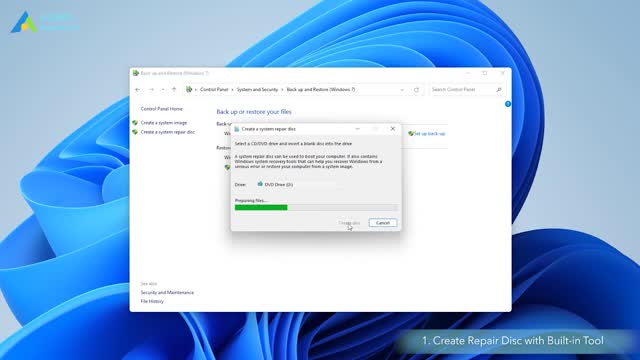
⏰ 0:50 Way 1. Create Repair Disc with Built-in Tool
If you want to make a repair disk please get your CD/DVD prepared.
1. Open Control Panel. Click "System and Security".
2. Click Backup and Restore (Windows 7).
3. Then, you will be asked to select a CD/DVD drive and insert a blank disc into the drive, please do as instructed.
4. Click "Create disc" to create Windows 10/11 recovery disk with CD/DVD. Then, it will start to write this disc, this process only takes a few minutes.
⏰ 1:30 Way 2. Create Recovery USB with Built-in Tool
If you want to create a recovery USB please prepare a flash drive that has at least 16 GB capacity, and ensure it’s empty, because all the data on the USB drive will be deleted. If you want, please
1. Connect the USB drive to your computer. Type “recovery drive” into the search box and select “Create a recovery drive”.
2. In the pop-out window, check the option “Back up system files to the recovery drive” and hit “Next”.
3. Then select the USB flash drive you prepared, and click” Next” to continue.
4. On the next screen, you will be told everything on the drive will be deleted, so please make sure there is no important data. Then, click “Create” to begin creating Windows 10/11 recovery USB drive.
⏰ 2:36 Way 3. Create Boot Repair Drive via AOMEI Backupper
If you want a more flexible way, you can choose to use a third-party media creator - AOMEI Backupper Standard. With it, you can not only create Windows 10/11 recovery USB for the current computer but also another PC, and it can be applied to all Windows PCs, including Windows 11/10/8/7 (both 32-bit and 64-bit).
1. Launch AOMEI Backupper Standard.
2. To recover Windows via this tool, you can create a regular system backup in the "Backup" tab. Then click “Tools” from the left panel and then select “Create Bootable Media”.
3. Select bootable disc type from Linux-based or Windows PE based, and click “Next”.
4. Then you can select a "CD/DVD" or "USB drive" to create this Windows 10/11 bootable recovery media. If you don't have CD/DVD or USB, you can choose to export Windows 10 recovery ISO image file and then click “Next” to run this process.
-
 7:21
7:21
Graya Overload
3 years agoCreate Windows 11 Install Media
6 -
 12:25
12:25
Roccodognosis
3 years agoCreate a Windows Bootable Drive
26 -
 4:12
4:12
Kaceli TechTraining
4 years agoInstall Windows 11 for Free - Upgrade Manually, Create Bootable USB
80 -
 4:03
4:03
tk Computer Service
3 years agoWindows XP - Create a shortcut to lock down the desktop
14 -
 LIVE
LIVE
The Chris Salcedo Show
11 hours agoDispelling Narrative Over Facts On Racism
611 watching -
 16:09
16:09
T-SPLY
17 hours agoFederal Agents Arrest Non Citizen Police Officer — Department Hires Him BACK!
31.7K34 -
 12:55
12:55
World2Briggs
19 hours ago $3.73 earnedTop 10 States With The Worst Weather | Natural Disasters
12.5K -
 21:52
21:52
The King of Camo
20 hours agoGOALS 2026 Range Day
11.6K2 -
 48:22
48:22
A Cigar Hustlers Podcast Every Day
1 day agoEpisode 421 Cigar Hustlers Podcast Every Week Day Rage Bait
12.8K3 -
 2:05:49
BEK TV
1 day agoTrent Loos in the Morning - 12/04/2025
12.3K2